| Date | Time | Details |
|---|---|---|
| 2026-04-24 | 11:59pm ET | Mini-Project #03 Due |
| 2026-04-30 | 6:00pm ET | Pre-Assignment #12 Due |
| 2026-05-03 | 11:59pm ET | Mini-Project Peer Feedback #03 Due |
| 2026-05-07 | 6:00pm ET | Final Project Presentation Slides Due |
| 2026-05-14 | 6:00pm ET | Pre-Assignment #14 Due |
| 2026-05-15 | 11:59pm ET | Mini-Project #04 Due |
| 2026-05-21 | 11:59pm ET | Final Project Summary Report Due [Tentative] |
| 2026-05-21 | 11:59pm ET | Final Project Individual Report Due [Tentative] |
| 2026-05-21 | 11:59pm ET | Final Project Teammate Peer Evaluations Due [Tentative] |
Software Tools for Data Analysis
STA 9750
Michael Weylandt
Week 11 – Thursday 2026-04-23
Last Updated: 2026-04-23
STA 9750 Week 11
Today: Lecture #09: Introduction to Web Technologies & Web Scraping
These slides can be found online at:
In-class activities can be found at:
Upcoming TODO
Upcoming student responsibilities:
STA 9750 Week 11
Today: Lecture #09: Introduction to Web Technologies & Web Scraping
- Communicating Results (
quarto) ✅ RBasics ✅- Data Manipulation in
R✅ - Data Visualization in
R✅ - Getting Data into
R⬅️- Files and APIs ✅
- Web Scraping ⬅️
- Cleaning and Processing Text
- Statistical Modeling in
R
Today
Today
- Course Administration
- Warm-Up Exercise
- New Material
- HTML Structure
- Selectors
- Parsing HTML with
rvest
- Wrap-Up
- Life Tip of the Day
Course Administration
Mini-Project #03
MP#03 - Who Goes There? US Internal Migration and Implications for Congressional Reapportionment
Due 2026-04-24 at 11:59pm ET
Topics covered:
- Data Import
- Using the
tidycensusPackage - Static files
- API Usage
- Using the
- Data Maipulation and Visualization
- Slicing and Dicing with
dplyr - Spatial visualization (optional)
- Slicing and Dicing with
Submissions so far look great!
Mini-Project #04
MP#04 - Going for the Gold
Due 2026-05-15 at 11:59pm ET
Topics covered:
- Data Import
- HTTP Request Construction (Last Week)
- HTML Scraping (Tabular) ⬅️ (Today)
- \(t\)-tests
- Putting Everything Together
Course Support
- Synchronous - MW Office Hours 2x / week:
- Wednesdays 5pm: In Person
- Thursdays 5pm: Zoom
- Asynchronous: Piazza (\(<45\) minute average response time)
Review Exercise
API Exercise
- Use the API to build the question bank for a trivia night
See this week’s Lab for details
Breakout Rooms
| Breakout Room | Team |
|---|---|
| 1 | Emissions Impossible (LR+MOG+APTL) |
| 2 | Maniac Braniacs (HHS+KK+FC+DN) |
| 3 | Water Benders (JE+JABB+MTP+JA+AS) |
| 4 | Inspector Gadget (MUO+KN+CM+ID+KM) |
| 5 | 3-1-Fun! (XC+ML+ER+RJSN) |
Working with HTML
HTML
HTML - HyperText Markup Language - is the language used to write web pages
- We have avoided writing HTML directly, in favor of Markdown
But you will have to read HTML
- In a web browser, right click and “View Source” on a page
HTML Elements
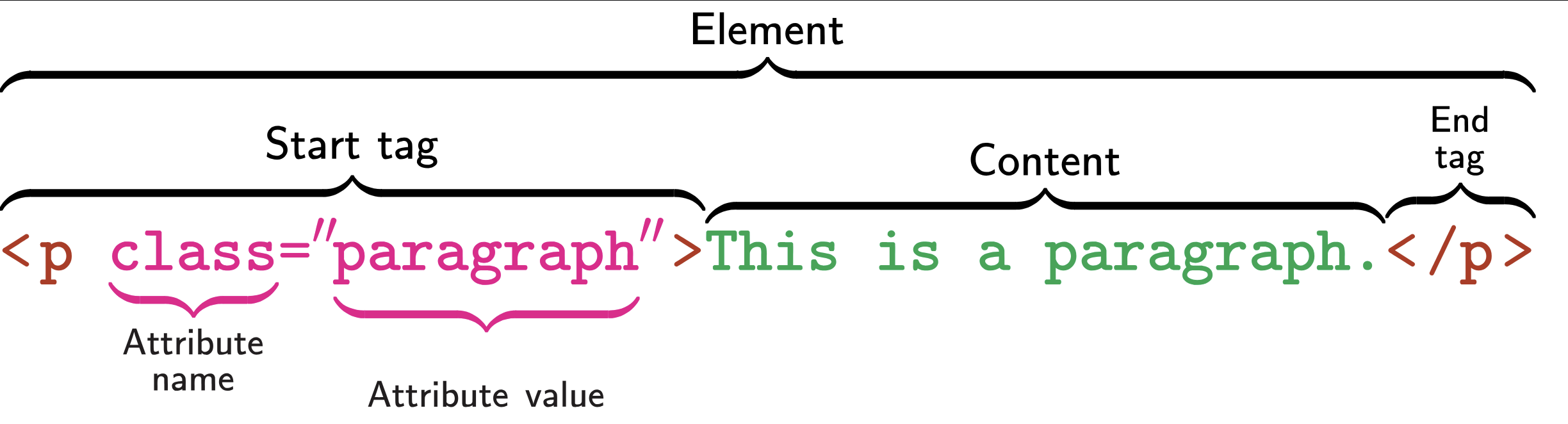
HTML is written as a nested series of elements:
Important Elements
There are many HTML elements; some important ones are:
body: Body (the ‘mean’ of a page)h1,h2, …: Headersdiv: Division (generic container)p: Paragraph (most text goes in these)table: Table (often how data is displayed)ul,ol: Lists (unordered and ordered)li: List Item (for both list types)a: Anchors (used for linking)
Important Elements
Other useful elements:
script: Javascript - the code that implements interactivitystyle: CSS - formatting and appearance
You won’t use these directly, but they are everywhere
HTML Element Selection
The SelectorGadget can be used to practice selecting elements on web pages
#idwill select by ID (“name”)typewill select all elements of that type.classwill select all elements with that class[attribute]will select elements with that attribute[attribute="value"]will select elements with that attribute and valuesel1 sel2will select elements matchingsel2that are inside asel1- e.g.,
tr .oddwill select the odd rows of agttable
- e.g.,
Advanced CSS Selectors
CSS Selector Pseudo-classes can be used to implement more specific logic
first-of-type(e.g.,table:first-of-typegets the first table)nth-of-type(e.g.,h2:nth-of-type(2)gets the secondh2)not(e.g.,tr:not(.odd)gets all table rows without theoddclass)
HTML Element Selection
From the pre-reading:
- Star Wars movie titles
main h2
- Baruch GPS
.geo
- Wikipedia CUNY Table
tableortbody
HTML Anchors
Anchors (a elements) are probably the most important part of HTML
Confusingly, anchors are both links and destinations.
Anchors can reference:
- Another page (
http://URL) - A particular part of another page (
http://URL#place) - A particular part of the same page (
#place)
Quarto supports cross-linking with anchors
HTML Anchors
Incoming link anchor:
<a id="#fish"> Content </a>
Links to http://page#fish will go straight to that spot
Outgoing link anchor:
<a href="https://baruch.cuny.edu"> Baruch </a>
Clicking text Baruch will go to Baruch website
HTML Tables
HTML Tables are often used for showing data:
<table>- Top level container<thead>and<tbody>- Separate header and body<trow>- Rows<td>- Table data (cells)
Can be much fancier - will see several examples in exercises
rvest
The rvest package can be used to manipulate HTML in R:
- Get HTML by either
read_htmlorresp_body_htmlif usinghttr2 - Select elements with
html_elements("selector")- Same syntax as SelectorGadget
- Use
html_elementif you only want the first
- Eventually need to extract content
html_textandhtml_text2(removes whitespace)html_attrgets attribute values (e.g., link targets)html_tablewill attempt to parse a table automatically
Example
Using httr2 to get the names of all 5 Mini-Projects
[1] "Mini-Project #00: Course Set-Up"
[2] "Mini-Project #01: Assessing the Impact of SFFA on Campus Diversity One-Year Later"
[3] "Mini-Project #02: How Do You Do ‘You Do You’?"
[4] "Mini-Project #03: Who Goes There? US Internal Migration and Implications for Congressional Reapportionment"
[5] "Mini-Project #04: Going for the Gold"
Breakout Exercise #01
Return to your breakout rooms for Exercise #01
- Use
html_element()to extract the course table - Use
html_table()to convert to a data frame
JavaScript Websites
JavaScript is a great tool, but R doesn’t know about it
- What you see might not be what
Rsees - Make sure to consider “raw” HTML
- Often ‘hijacks’ important elements to add new features
- Focus on standard HTML elements
Breakout Exercise #02
Return to your breakout rooms for Exercise #02
- Finding a table in a more complex website
- Pulling out desired data
- Making a map of results (optional)
read_html_live
rvest also provides tools for interacting with sites as shown in the browser
read_html_live()
User interface is a bit different - we have to load the page explicitly and interact with a persistent object:
Should remind you of Python’s obj.method() syntax
This is advanced, so don’t worry too much about it until you need it
Non-Tabular Data
Often, data will not be in a nice table
- Need to manually build a
data.frame - Build each data frame and ‘combine’
map |> list_rbind()idiomDATA <- rbind(DATA, NEW_DATA)idiom
Loops
Recall the basic structure of a loop in R:
Example
Getting info about all pre-assignments
library(rvest)

preassigns <- read_html("https://michael-weylandt.com/STA9750/preassignments.html") |>
    html_element("#pre-assignments") |>
    html_elements("section")

pa_details <- tibble()
for(pa in preassigns){
    name        = pa |> html_element("h4") |> html_text2()
    description = pa |> html_elements("p:last-of-type") |>  html_text2()

    pa_df <- tibble(name = name, description = description)

    pa_details <- rbind(pa_details, pa_df)
}

pa_details
Example
Functional syntax is a bit more compact
library(rvest)

preassigns <- read_html("https://michael-weylandt.com/STA9750/preassignments.html") |>
    html_element("#pre-assignments") |>
    html_elements("section")

parse_pa <- function(pa){
    name <- pa |> html_element("h4") |> html_text2()
    description <- pa |> html_elements("p:last-of-type") |>  html_text2()

    tibble(name = name, description = description)
}

pa_details <- preassigns |> map(parse_pa) |> list_rbind()

pa_details
Example
When vectorization is possible (via html_elements) - even cleaner:
library(rvest)

preassigns <- read_html("https://michael-weylandt.com/STA9750/preassignments.html") |>
    html_element("#pre-assignments") |>
    html_elements("section")

names <- preassigns |> html_elements("h4") |> html_text2()
descriptions <- preassigns |> html_elements("p:last-of-type") |>  html_text2()

pa_details <- tibble(name = names, description = descriptions)

pa_details
Breakout Exercise #03
Return to your breakout rooms for Exercise #03
- Examining a multi-page site
- Pulling out data from non-tabular elements
Wrap Up
Wrap Up
Processing HTML in R
- HTML Structure
- HTML Selectors
html_tableand<table>elements- HTML Anchors and Links
Musical Treat
You might recognize the finale from Fantasia 2000