| Date | Time | Details |
|---|---|---|
| 2026-03-13 | 11:59pm ET | Mini-Project #01 Due |
| 2026-03-19 | 6:00pm ET | Pre-Assignment #07 Due |
| 2026-03-22 | 11:59pm ET | Mini-Project Peer Feedback #01 Due |
| 2026-03-26 | 6:00pm ET | Mid-Semester Check-In Slides Due |
| 2026-04-02 | 11:59pm ET | Mid-Semester Teammate Peer Evaluations Due |
| 2026-04-02 | NA | Classes Cancelled (Spring Break – Week 1) |
| 2026-04-03 | 11:59pm ET | Mini-Project #02 Due |
| 2026-04-09 | NA | Classes Cancelled (Spring Break – Week 2) |
Software Tools for Data Analysis
STA 9750
Michael Weylandt
Week 6 – Thursday 2026-03-12
Last Updated: 2026-03-09
STA 9750 Week 6
Today: Lecture #05: Multi-Table dplyr Verbs
These slides can be found online at:
In-class activities (if any) can be found at:
Upcoming TODO
Upcoming student responsibilities:
STA 9750 Week 6
Today: Lecture #05: Multi-Table dplyr Verbs
Today
Today
- Mini-Projects
- Review
- Diving Deeper into Multi-Table Verbs
- PA#05 FAQs
- Wrap-Up
- Life Tip of the Day
MP#01 - Deadline Soon
Mini-Project #01 due on 2026-03-13 at 11:59pm ET
Topics Covered:
- Reproducible Research Tooling
- Packages and Functions
- Basic Data Manipulation
- Tables for Data Display
Make sure to complete all instructor-provided EDA questions and writing prompts
Be reasonable, justify, and document your analysis.
- Do your answers pass the sniff test?
- At least one sentence of text per short question is a good baseline
MP#01 - Peer Feedback
Assigned on GitHub - due on 2026-03-22
- \(\approx 4\) feedbacks each
- Take this seriously: 20% of this assignment is “meta-review”
- Goal: rigorous constructive critique
Use helper function to perform peer feedback assigned to you. Ask on Piazza if still having trouble.
MP#01 - Peer Feedback
Submissions may not map perfectly to rubric - use your best judgement
Be generous but serious:
- Goal is improvement, so “everything is great, no comments” is unhelpful
- Nothing is completely right nor completely wrong
- Remember, meta-review (instructor scores of your feedback) to follow
Learn from this! What can you adapt for MP#02?
MP#01 - Peer Feedback
Example of poor feedback:
Comments
Website looks really good, nice and clean!

Written Communication
Excellent and straight to the point.

Project Skeleton
Solid skeleton, well-organized .

Formatting & Display
Nicely formatted and balanced across the website.

Code Quality
Code runs like Forrest Gump in a Slump.

Data Preparation
Very great.

Extra Credit
Added graphes for even better understanding.- Superficial comments / no sign of actually reading work
Red Flag: Repeated verbatim on several posts
Reminder: Poor feedback \(\neq\) poor work.
MP#01 - Peer Feedback
Example of medium feedback:
## Comments

Love the visuals for Press Releases.

### Written Communication

A short summary or a description of this project would be great to add.

### Project Skeleton

Code completes all instructor-provided tasks correctly.

### Formatting & Display

Tables have well-formatted column names; caption would be great.

### Code Quality

Code is clear and well written.

### Data Preparation

Automatic (10/10). Out of scope for this mini-project.

### Extra Credit

I found all the Press Releases very interesting. The visuals were a great touch.- Gave actionable suggestions
- Directionally correct, but a bit vague
MP#01 - Peer Feedback
Example of great feedback:
### Written Communication

Overall, your writing is clear and easy to follow. I noticed a few small typos,
but nothing major — using the built-in spell check in RStudio should catch those quickly. Everything else looks solid, and I didn’t have any major concerns based
on my review.

### Project Skeleton

All tasks were completed satisfactorily.

### Formatting & Display

Overall, your tables and figures are well-organized and clear. There is one
table in the "Data" section with column titles that could be formatted a little
more cleanly for easier reading. I also noticed a few small typos in some of the
table captions, but they should be easy to fix.

### Code Quality

The code quality is generally good, but there are a few minor linter issues. The
comments could be more frequent and clearer in some places. For example, the
comment `#checking dupolicate so that github will not block it` should be
corrected to "duplicate," and the explanation could be clarified to avoid
confusion–what duplicate are you referring to, and how does it block GitHub?
It might confuse someone else reading the code.

Also, I would recommend moving all library imports to the top of the script, as that is typically considered standard practice.

### Data Preparation

The data preparation looks solid overall. I like how you handle missing files
and JSON parsing failures–it demonstrates strong defensive programming.

### Extra Credit

Additional two points for using quarto's video support!- Positive tone
- Detailed comments
- Noted issues & gave suggestions on how to fix
- Noted unclear sections for improvement
MP#01 - Peer Feedback
Lack of prior experience is not a hinderance here:
- If something is unclear to you, that’s a problem!
- Nothing required super-complex code, so anything overly complex probably could have been a simpler way (except for some above-and-beyond stuff)
- You don’t have to be definitive in comments - impressions and questions are just as helpful.
MP FAQs
Q: Why doesn’t my site look the same on GitHub as it does on my laptop?
A: Missing css and js files. Need to upload everything in docs.
MP FAQs
Q: Why doesn’t my submission have the right URL?
A: Most computers have case-sensitive file names, Mac doesn’t, and Windows is iffy.
Mini-Project #02
MP#02 released - How Do You Do ‘You Do You’?
Due2026-04-03 at 11:59pm ET
- GitHub post (used for automated checks) AND Brightspace
- 22 days: don’t wait until the very end
Topics covered:
- Combining Data from Different Sources
- Data Visualization
- Using Survey Weights for Microdata Analysis
Upcoming Mini-Projects
Tentative Topics
- MP#03: State-to-State Moving - 2026-04-24 at 11:59pm ET
- MP#04: Olympics Results - 2026-05-15 at 11:59pm ET
Review from Last Week
Single-Table Verbs
dplyr single-table verbs
select,filter: Selecting rows and columnsrename,mutate: Changing rows and columnssummarize,group_by: Combining multiple rowsarrange,slice_min/max: Re-ordering
Breakout Rooms
| Breakout | Team |
|---|---|
| 1 | XC+ML+ER+RJSN |
| 2 | MUO+KN+CM+ID+KM |
| 3 | HHS+KK+FC+DN |
| 4 | LR+MOG+APTL+TN |
| 5 | JE+JABB+MTP+JA+AS |
Multi-Table Verbs
Multi-Table Analysis
Multiple Tables:
- More insights than from a single table
- Maintain ‘tidy’ structure throughout
Will create new (compound) rows:
- Dangers: drops and (over) duplication
Primary Keys
Keys are unique identifiers for individual records
- Primary (one column) or compound (multiple columns together)
The history of corporate IT is largely one of (failed) primary keys
- Finance: Tickers, Tickers + Exchange, Tickers + Share Class, CUSIP, ISIN, SEDOL, …
Meaningful true keys are vanishingly rare - cherish them when you find them
Often ‘unique enough’ for an analysis
dplyr::group_by() + dplyr::count() is helpful here
Joins
Joins combine tables by identity - not simple ‘stacking’
Specify a join key - ideally this is an actual key, but doesn’t have to be
In dplyr, we use the join_by function:
Here table_1_name and table_2_name are column names from two tables
Join rows where these values are equal (advanced joins possible)
Inner and Outer Joins
When tables are perfectly matched, not an issue:
# A tibble: 4 × 2
  college campus_borough
  <chr>   <chr>
1 CCNY    Manhattan
2 Baruch  Manhattan
3 CSI     Staten Island
4 York Queens Inner and Outer Joins
When tables are perfectly matched, not an issue:
# A tibble: 4 × 3
  college campus_borough bus_code
  <chr>   <chr>          <chr>
1 CCNY    Manhattan      M
2 Baruch  Manhattan      M
3 CSI     Staten Island  S
4 York    Queens         Q
Default to inner but irrelevant
Note automatic repetition of "M" row
Inner and Outer Joins
How to handle ‘unaligned’ values?
cunys <- tribble(~college, ~campus_borough,
                 "CCNY", "Manhattan",
                 "Baruch", "Manhattan",
                 "CSI", "Staten Island",
                 "York", "Queens",
                 "Medgar Evers", "Brooklyn")

inner_join(cunys, routes, join_by(campus_borough == borough_name))
# A tibble: 4 × 3
college campus_borough bus_code
<chr> <chr> <chr>
1 CCNY Manhattan M
2 Baruch Manhattan M
3 CSI Staten Island S
4 York Queens Q MEC vanished!
Inner and Outer Joins
# A tibble: 5 × 3
  college      campus_borough bus_code
  <chr>        <chr>          <chr>
1 CCNY         Manhattan      M
2 Baruch       Manhattan      M
3 CSI          Staten Island  S
4 York         Queens         Q
5 Medgar Evers Brooklyn       <NA>
MEC stays, but no bus code - NA value
inner_join- Keep only matchesleft_join- Keep all rows in left (first) table even w/o matchesright_join- Keep all rows in right (second) table even w/o matchesfull_join- Keep all rows from both tables, even w/o matches
left_ and right_ are types of ‘outer’ joins
Pivoting
The pivot_* functions change the shape of data
- Values are not created or destroyed, just moved around
- wider data sets are formed by forming multiple rows into columns
- longer data sets are splitting columns from the same row into new rows
Pivoting
Untidy example from last week:
# A tibble: 12 × 4
   Semester Course     Number Type
   <chr>    <chr>       <dbl> <chr>
 1 Fall     Accounting    200 Enrollment
 2 Fall     Accounting    250 Cap
 3 Fall     Law           100 Enrollment
 4 Fall     Law           125 Cap
 5 Fall     Statistics    200 Enrollment
 6 Fall     Statistics    200 Cap
 7 Spring   Accounting    300 Enrollment
 8 Spring   Accounting    350 Cap
 9 Spring   Law            50 Enrollment
10 Spring   Law           100 Cap
11 Spring   Statistics    400 Enrollment
12 Spring   Statistics    400 Cap
Pivoting
This data was untidy because it split a single unit (course) across multiple rows
pivot_wider to get to the right format
Pivots
pivot_ changes the shape of a data set. Purposes:
- Get ready for presentation
- Prep for a join
- Combine rows before looking at ‘cross-row’ structure
Pivots
Which penguin species has the largest between-sex mass difference?
library(tidyr)
avg_mass_tbl <- penguins |> drop_na() |>
    group_by(sex, species) |>
    summarize(avg_mass = mean(body_mass), .groups="drop")
    # .groups="drop" is equivalent to |> ungroup()
avg_mass_tbl
# A tibble: 6 × 3
sex species avg_mass
<fct> <fct> <dbl>
1 female Adelie 3369.
2 female Chinstrap 3527.
3 female Gentoo 4680.
4 male Adelie 4043.
5 male Chinstrap 3939.
6 male Gentoo 5485.Pivots
We want data that is wider (or at least not longer) than our current data:
| species | male_avg | female_avg |
|---|---|---|
| Adelie | … | … |
| Chinstrap | … | … |
| Gentoo | … | … |
Pivots
For the penguins:
# A tibble: 3 × 3
  species   female  male
  <fct>      <dbl> <dbl>
1 Adelie     3369. 4043.
2 Chinstrap  3527. 3939.
3 Gentoo 4680. 5485.Pivots
pivot_wider Arguments:
id_cols: kept as ‘keys’ for new tablenames_from: existing column ‘spread’ to create new columns namesvalues_from: values in new table
pivot_longer:
- ‘Inverse’ operation
- Spread one row + multiple columns => one col + multiple rows
pivot_wider and pivot_longer have many additional arguments for dealing with repeats / missing values. The help page (+ experimenting) is your friend
Legos of Data Analysis
These functions are like Legos:
- Simple individually
- Combine for complex structures
Legos of Data Analysis
Q: How many distinct flights left NYC in 2013?
Not quite what we wanted…
Legos of Data Analysis
Q: How many distinct flights left NYC in 2013?
Legos of Data Analysis
Q: How many distinct flights left NYC in 2013?
💡 Did airlines re-use flight numbers for different destinations?
flights |>
    distinct(carrier, flight, dest) |>
    # Find reuse of number across different destinations
    # Shorthand for group_by + summarize(n = n())
    count(carrier, flight)
# A tibble: 5,725 × 3
carrier flight n
<chr> <int> <int>
1 9E 2900 1
2 9E 2901 1
3 9E 2902 1
4 9E 2903 2
5 9E 2904 2
6 9E 2905 1
7 9E 2906 1
8 9E 2907 1
9 9E 2908 1
10 9E 2909 2
# ℹ 5,715 more rowsSeems so!
Legos of Data Analysis
Q: How many distinct flights left NYC in 2013?
Find examples of re-use:
Legos of Data Analysis
Q: How many distinct flights left NYC in 2013?
Finding most re-used flight number:
flights |>
    distinct(carrier, flight, dest) |>
    count(carrier, flight) |>
slice_max(n) |>
left_join(flights, join_by(carrier == carrier, flight == flight)) |>
pull(dest) |> # pull out column as vector
table() # frequency table
BOS CLE DEN DFW IAH JAC LAS MIA MSY ORD SAN SAT SEA SFO SNA TPA
 13   1  19   5   8   2   1   2   8  55   4   1  18   2  27   4
Legos of Data Analysis
Q: How many distinct flights left NYC in 2013?
Finding most re-used flight number:
Legos of Data Analysis
Q: How many distinct flights left NYC in 2013?
Seeing where our most reused number went:
flights |>
    distinct(carrier, flight, dest) |>
    count(carrier, flight) |>
slice_max(n) |>
inner_join(flights, join_by(carrier == carrier, flight == flight)) |>
count(flight, carrier, dest)# A tibble: 16 × 4
flight carrier dest n
<int> <chr> <chr> <int>
1 1162 UA BOS 13
2 1162 UA CLE 1
3 1162 UA DEN 19
4 1162 UA DFW 5
5 1162 UA IAH 8
6 1162 UA JAC 2
7 1162 UA LAS 1
8 1162 UA MIA 2
9 1162 UA MSY 8
10 1162 UA ORD 55
11 1162 UA SAN 4
12 1162 UA SAT 1
13 1162 UA SEA 18
14 1162 UA SFO 2
15 1162 UA SNA 27
16 1162 UA TPA 4Legos of Data Analysis
Q: How many distinct flights left NYC in 2013?
Additional join to get airport information + formatting:
flights |>
    distinct(carrier, flight, dest) |>
    count(carrier, flight) |>
    slice_max(n) |>
    inner_join(flights, join_by(carrier == carrier, flight == flight)) |>
count(flight, carrier, dest) |>
inner_join(airports, join_by(dest == faa)) |>
select(name, n, carrier, flight) |>
arrange(desc(n)) |>
rename(`Destination Airport` = name,
`Number of Times Flown` = n,
`Carrier Code` = carrier,
`Flight Number`= flight)# A tibble: 16 × 4
`Destination Airport` Number of Times Flow…¹ `Carrier Code` `Flight Number`
<chr> <int> <chr> <int>
1 Chicago Ohare Intl 55 UA 1162
2 John Wayne Arpt Orange… 27 UA 1162
3 Denver Intl 19 UA 1162
4 Seattle Tacoma Intl 18 UA 1162
5 General Edward Lawrenc… 13 UA 1162
6 George Bush Interconti… 8 UA 1162
7 Louis Armstrong New Or… 8 UA 1162
8 Dallas Fort Worth Intl 5 UA 1162
9 San Diego Intl 4 UA 1162
10 Tampa Intl 4 UA 1162
11 Jackson Hole Airport 2 UA 1162
12 Miami Intl 2 UA 1162
13 San Francisco Intl 2 UA 1162
14 Cleveland Hopkins Intl 1 UA 1162
15 Mc Carran Intl 1 UA 1162
16 San Antonio Intl 1 UA 1162
# ℹ abbreviated name: ¹`Number of Times Flown`Legos of Data Analysis
Q: How many distinct flights left NYC in 2013?
Extra join to match to airlines as well:
Also has a column named name - need to disambiguate!
Legos of Data Analysis
Q: How many distinct flights left NYC in 2013?
Additional join to get airport information + formatting:
flights |>
    distinct(carrier, flight, dest) |>
    count(carrier, flight) |>
    slice_max(n) |>
    inner_join(flights, join_by(carrier == carrier, flight == flight)) |>
    count(flight, carrier, dest) |>
    inner_join(airports, join_by(dest == faa)) |>
    select(name, n, carrier, flight) |>
    rename(dest_name = name) |>
    inner_join(airlines, join_by(carrier == carrier)) |>
    arrange(desc(n)) |>
    select(-carrier) |>
    rename(`Destination Airport` = dest_name,
           `Number of Times Flown` = n,
           `Carrier` = name,
           `Flight Number`= flight)
# A tibble: 16 × 4
`Destination Airport` Number of Times Flow…¹ `Flight Number` Carrier
<chr> <int> <int> <chr>
1 Chicago Ohare Intl 55 1162 United…
2 John Wayne Arpt Orange Co 27 1162 United…
3 Denver Intl 19 1162 United…
4 Seattle Tacoma Intl 18 1162 United…
5 General Edward Lawrence Logan… 13 1162 United…
6 George Bush Intercontinental 8 1162 United…
7 Louis Armstrong New Orleans I… 8 1162 United…
8 Dallas Fort Worth Intl 5 1162 United…
9 San Diego Intl 4 1162 United…
10 Tampa Intl 4 1162 United…
11 Jackson Hole Airport 2 1162 United…
12 Miami Intl 2 1162 United…
13 San Francisco Intl 2 1162 United…
14 Cleveland Hopkins Intl 1 1162 United…
15 Mc Carran Intl 1 1162 United…
16 San Antonio Intl 1 1162 United…
# ℹ abbreviated name: ¹`Number of Times Flown`Legos of Data Analysis
Question: What does this do I can’t do in Excel?
Technically, nothing. All programming languages of sufficient complexity are equally powerful (Turing equivalence).
In actuality, quite a lot:
filterallows more complex filtering than clicking on valuesgroup_by+summarizeextend array formulas*_joinprovides more complex matching thanVLOOKUPpivot_*provide general formulation of pivot tableseverything else you can do in
R.
Ability to script minimizes “hard-coding” of names and values.
But truthfully
Let's not kid ourselves: the most widely used piece of software for statistics
is Excel.
   -- Brian D. Ripley ('Statistical Methods Need Software: A View of
      Statistical Computing')
Opening lecture RSS 2002, Plymouth (September 2002)Diving Deeper into Multi-Table Verbs
Diving deeper Into Joins
Data Set: nycflights13
Exercises: Lab #05
Additional dplyr Tricks
- Ranking functions
row_number,min_rank,dense_rank: differ in ties- Use with
desc()to flip ordering cum_dist,percent_rank: compute quantiles
- Cumulative Statistics
cummean,cummax,cummin, …
Multi-Table FAQs
Subqueries
[W]ill we be learning how to perform joins within a subquery?
You don’t need subqueries in R since it’s an imperative language. Just create a new variable to represent the result of the subquery and use that in the next command.
SELECT first_name, last_name
FROM collectors
WHERE id IN (
    SELECT collector_id
    FROM sales
);
collector_ids <- sales |> pull(collector_id)
collectors |> filter(id %in% collector_ids) |> select(first_name, last_name)Data Integrity
[H]ow can we ensure that the information [resulting from a join] is accurate and not repeated?
- If you have a true unique ID, you’re usually safe
- Pay attention to all warnings
- Manually examine the result of any joins
Performance
Will joining large data sets […] affect performance?
Somewhat - larger data sets are always slower.
Bigger danger is “bad joins” creating huge data automatically.
Note that R is less “smart” than SQL, so won’t optimize execution order for you automatically.
dplyr joins vs SQL joins
What is the difference between
dplyrandSQLjoins?
Not too much - biggest difference is no INDEX or FOREIGN KEY in R so less guarantees of data integrity.
When to use anti_join()?
Rare: looking for unmatched rows.
- Useful to find data integrity issues or ‘implicit’ missingness.
- I use an
anti_jointo find students who haven’t submitted an assignment.
many-to-many Warning
Tricky to address, but fortunately pretty rare.
SQLexplicitly forbids many-to-many- Usually a sign that a “key” isn’t really unique
- Check for duplicates in
xandytables - Can occur with “fancy” joins (rolling, inequality)
- Check for duplicates in
- Add additional join variables to break “duplication”
How to Check Efficiency?
No automatic way. Some rules of thumb:
- Don’t create large tables just to filter down
- filter before join when possible
full_outerjoin is a bit dangerouscross_joinis rarely the right answer
tidyr vs dplyr
Is
tidyrmore efficient thandplyr?
Nope - different packages from the same developers.
Designed to work together elegantly.
Rare Joins
What are
cross_join, filter joins, andnest_join?
cross_join: dangerous.- Creates “all pairs” of rows. Useful for ‘design’ problems
- filter joins (
anti_,semi_):- Hunting down quietly missing data.
- Filtering to sub-samples
nest_join: beyond this course.left_joinwith extra structure to output.
Wrap-Up
Review
Multi-Table dplyr:
inner_joinandleft_joinjoin_byspecificationspivot_longerandpivot_widerto get data into optimal formats (tidyr)
Additional dplyr:
- Ranking, cumulative, and shift functions
Orientation
- Communicating Results (
quarto) ✅ RBasics ✅- Data Manipulation in
R✅ - Data Visualization in
R⬅️ - Getting Data into
R - Statistical Modeling in
R
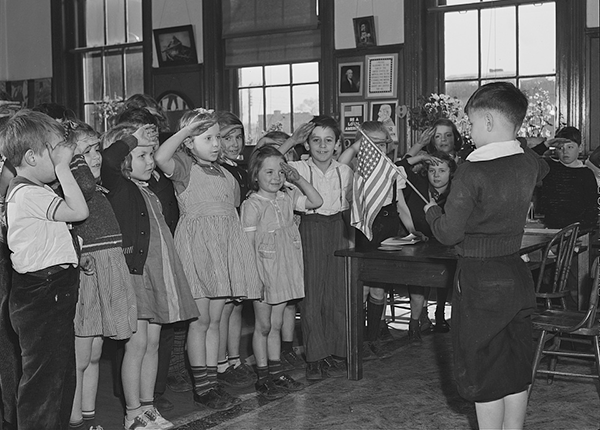
Life Tip of the Week
West Virginia State Board of Education v. Barnette (March 11, 1943)
Students cannot be compelled to recite the Pleldge of Allegiance, even during a period of war
Iconic First Amendment Victory
Barnette
Justice Jackson’s Opinion (6-3):
If there is any fixed star in our constitutional constellation, it is that no official, high or petty, can prescribe what shall be orthodox in politics, nationalism, religion, or other matters of opinion or force citizens to confess by word or act their faith therein.
Story Behind the Case
1940 Case Minersville School District v. Gobitis
- JW Students in PA refused to recite Pledge of Allegience
Justice Frankfurter (8-1 Majority Opinion):
National Unity is the basis of National Security
Students could be forced to pledge
After the decision, waves of violence against JW students and adults accused of “treason” against the war effort
Story Behind the Case
Justice Stone (Dissent):
[T]he guarantees of civil liberty are but guarantees of freedom of the human mind and spirit and of reasonable freedom and opportunity to express them. [… T]he very essence of the liberty which they guarantee is the freedom of the individual from compulsion as to what he shall think and what he shall say.
A few years later, changed court wanted to revisit, leading to Barnette
More from J. Jackson
As governmental pressure toward unity becomes greater, so strife becomes more bitter as to whose unity it shall be.[…] Those who begin coercive elimination of dissent soon find themselves exterminating dissenters. Compulsory unification of opinion achieves only the unanimity of the graveyard.
Authority [in the United States] is to be controlled by public opinion, not public opinion by authority.
More from J. Jackson
[F]reedom to differ is not limited to things that do not matter much. That would be a mere shadow of freedom. The test of its substance is the right to differ as to things that touch the heart of the existing order.
Lessons
- We get things wrong, often very wrong, in times of public fear
- Law of Free Speech is necessary but not sufficient for a Culture of Free Speech
- Freedom to Dissent is at the core of a pluralistic society
- Rules and norms exist for the hard cases, not the easy ones
Baruch Connects - Civil Discourse Initiative
